
We are Actively Seeking Candidates for our Authorized Commercial Use Program in the following regions: UK, EU, Australia, and Southeast Asia. If you are interested in the program yourself, or may know someone who is, please visit the link and/or share
Browse our huge collection of Model Railroad Benchwork Products below, or enter your search query.
Customer Comments ————– Shipping———–Current Lead Times———Product Releases and Updates——–Tools for Assembling Your Benchwork
Benchwork Builder Pro™
Benchwork Builder Pro™
Automated Model Railroad and Model Railway Benchwork Drawing Software
Create Complete Custom Benchwork Shop Drawings Automatically
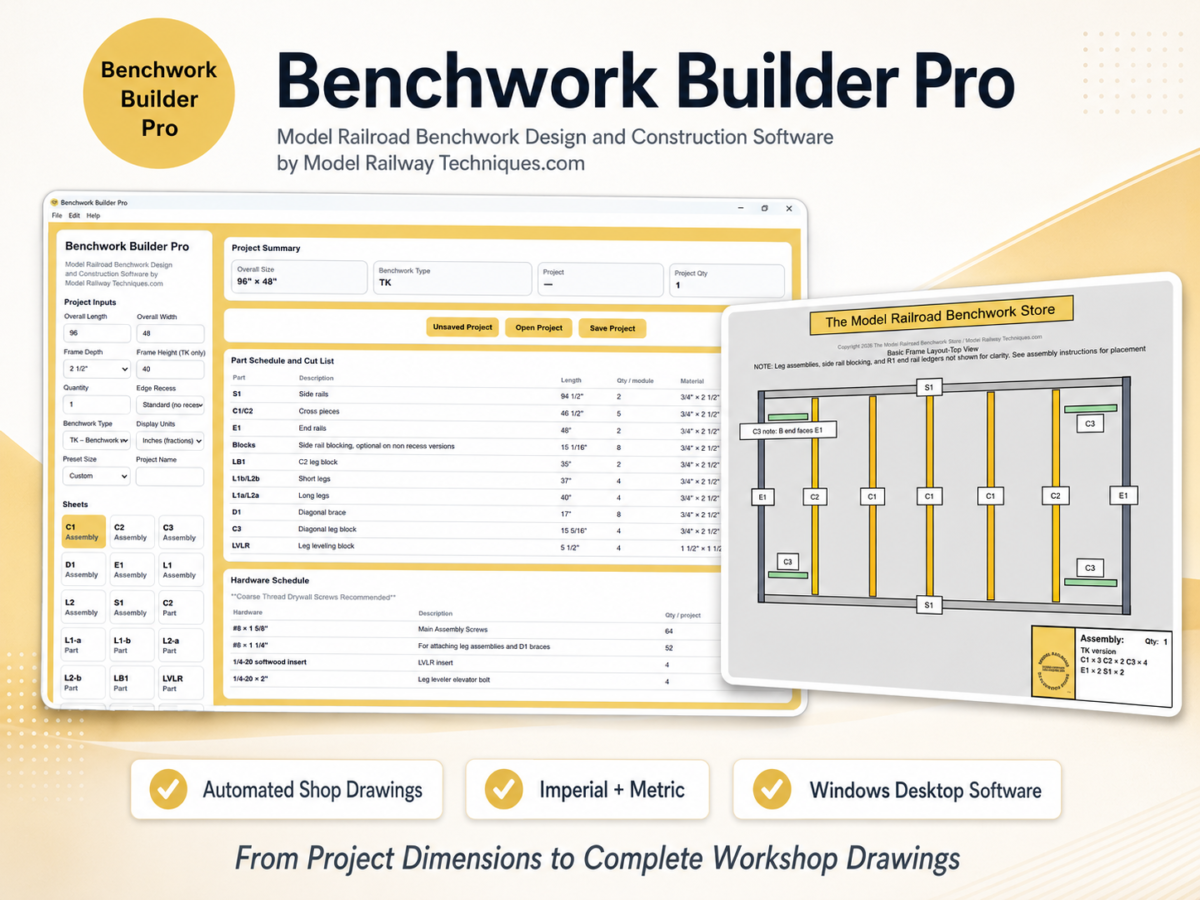
Benchwork Builder Pro™ is a purpose-built Windows desktop application that transforms your project specifications into a complete, fully dimensioned benchwork drawing set.
Instead of manually calculating every component, transferring values into blank drawing fields, or drafting individual parts, simply enter your project measurements and options. Benchwork Builder Pro automatically updates the assembly drawings, part drawings, quantities, cut lists, hole locations, alignment markings, and hardware information throughout the project.
Designed to be the definitive choice for custom model railroad benchwork and model railway baseboard construction, Benchwork Builder Pro brings together automated design, fabrication drawings, material planning, project saving, printing, and PDF export in one specialized application.
Known as model railroad benchwork in North America and model railway baseboards in many other parts of the world, the supporting structure of a layout must be accurately planned before construction begins.
Benchwork Builder Pro reduces repetitive calculations, measuring errors, and drawing preparation—so you can spend less time drafting and more time building your layout.
✅ What Benchwork Builder Pro Automatically Generates
Depending on the selected project configuration, the software produces:
✅ Fully dimensioned assembly drawings
✅ Fully dimensioned individual part drawings
✅ Part names and required quantities
✅ Master cut lists and cutting information
✅ Hole locations
✅ Assembly and alignment markings
✅ Hardware schedules
✅ Material and component summaries
✅ Printable individual drawing sheets
✅ Complete PDF drawing sets
Changes made to your project specifications are reflected throughout the drawing set in real time.
There is no need to manually transfer calculated dimensions into fillable drawing fields.
🌍 Designed for Model Railroad and Model Railway Builders Worldwide
Benchwork Builder Pro supports both imperial and metric project workflows.
✅ Enter and review dimensions using inches or millimeters
✅ Generate drawings for imperial or metric construction
✅ View metric equivalents throughout the supporting documentation
✅ Create printable drawing sets suitable for workshop use worldwide
The software is suitable for builders in:
- The United States
- Canada
- The United Kingdom
- Europe
- Australia
- New Zealand
- Asia
- Other international markets
The software interface, activation process, documentation, and customer support are currently provided in English.
🧰 A Purpose-Built Benchwork Design Application
Benchwork Builder Pro is not general-purpose CAD software and does not require you to manually draw every component.
It was created specifically to help model railroad and model railway builders turn their project dimensions into organized, fabrication-ready workshop information.
The software combines:
✅ Automated drawing generation
✅ Benchwork-specific calculations
✅ Part and material planning
✅ Repeatable professional drawing output
✅ Project saving and editing
✅ Printing and PDF export
✅ Imperial and metric operation
This specialized workflow makes Benchwork Builder Pro a category-defining alternative to manually preparing benchwork plans, cutting lists, and individual part drawings.
💾 Save, Reopen, and Reuse Your Projects
Projects can be saved and reopened for later editing.
Save Project
Use Save Project to save the latest changes to the project that is currently open.
Save Project As
Use Save Project As when you want to:
✅ Preserve the original project without overwriting it
✅ Create a separate design variation
✅ Use an existing project as the starting point for another project
✅ Save the project under a different name
✅ Save the project in a different location
This allows you to create and retain multiple benchwork configurations without starting over each time.
🖨️ Print and Export Your Drawing Set
Benchwork Builder Pro allows you to:
✅ Print the current drawing sheet
✅ Print the complete drawing set
✅ Export the current sheet as a PDF
✅ Export the complete drawing set as a PDF
Exported drawings can be opened and reviewed in your normal PDF viewer before printing or taking them into the workshop.
📘 Included Documentation
Your customer download package includes:
✅ Quick Start Guide
✅ Introduction and Full Instructions
✅ Material Recommendations
✅ Software License and Terms of Use
A separate Installation and Activation Guide is also available directly from the product page.
The supporting documentation includes both imperial measurements and metric equivalents where applicable.
👤 Who Benchwork Builder Pro Is For
Benchwork Builder Pro is designed for model railroad and model railway builders who:
✅ Want to build custom benchwork or baseboards
✅ Need sizes unavailable in fixed-dimension plan packages
✅ Want complete workshop drawings without learning CAD
✅ Are comfortable using ordinary woodworking tools
✅ Want to reduce repetitive calculations and measuring errors
✅ Need accurate part quantities and cutting information
✅ Want printable drawings for workshop construction
✅ Are planning larger, custom-sized, or multi-section layouts
✅ Want to save and modify project variations
The software is especially valuable when manually preparing every assembly drawing, component drawing, dimension, hole location, and cut-list entry would be time-consuming.
❌ What Benchwork Builder Pro Is Not
Benchwork Builder Pro is not:
❌ Track-planning software
❌ General-purpose CAD software
❌ A structural engineering service
❌ A physical benchwork or baseboard kit
❌ An automated woodworking machine
❌ A substitute for safe woodworking practices
❌ A commercial fabrication license
❌ A multi-user club, school, or business license
The purchaser remains responsible for reviewing the generated dimensions, selecting appropriate materials and fasteners, using suitable tools, following safe construction practices, and confirming that the completed structure is appropriate for the intended installation.
🔐 Personal Software License
Your Benchwork Builder Pro license will be issued to the purchaser named on the order and delivered to the email address used during checkout.
Please use the purchaser’s name when activating the software.
Each license is for:
✅ One individual purchaser
✅ One activated computer at a time
✅ Personal, noncommercial use
The license may not be shared with another person, business, club, school, workshop, or organization.
The software, installer, license key, documentation, generated shop drawings, cut lists, schedules, and related materials may not be copied, uploaded, resold, distributed, or commercially exploited except as expressly permitted by the Software License and Terms of Use.
The purchaser may provide necessary exported drawings to one fabricator solely for construction of the purchaser’s own personal project, subject to the license terms.
📥 Download and License Delivery
After payment, Ecwid provides access to:
✅ The Benchwork Builder Pro customer-package ZIP
✅ The standalone Installation and Activation Guide
The software download link remains active for seven days and permits one download.
Please save the downloaded ZIP file in a secure location.
Your individual activation license will be created separately and sent to the email address used during checkout.
The license key is case-sensitive and special-character-sensitive and must be entered exactly as provided.
🔑 Activation and License Revalidation
An internet connection is required during initial activation.
Benchwork Builder Pro periodically revalidates the license approximately every 30 days.
If revalidation cannot be completed because of a temporary internet connection or Keygen service problem, the software may provide a limited seven-day grace period while continuing to retry validation.
The grace period does not apply to licenses that are explicitly:
❌ Invalid
❌ Revoked
❌ Expired
❌ Assigned to another computer
❌ Being used in violation of the license terms
🔄 Computer Transfers
A verified purchaser may request a manual license transfer when replacing, upgrading, repairing, or permanently retiring the licensed computer.
The previous activation will normally be removed before the replacement computer is activated.
A transfer:
✅ Allows a verified purchaser to move to a replacement computer
❌ Does not create an additional license
❌ Does not permit simultaneous use on two computers
❌ Does not transfer ownership to another person
🛠️ Software Updates
Your purchase includes eligible bug fixes and minor improvements released within the Benchwork Builder Pro version 1.x series.
Future major versions, optional modules, redesigned products, or separately licensed features may be offered as paid upgrades.
Reasonable efforts will be made to maintain version 1.x compatibility with the supported Windows configurations published for the product.
Permanent compatibility with every future Windows release, hardware configuration, printer driver, antivirus program, security product, or third-party service cannot be guaranteed.
💳 Refund and Cancellation Information
An order may be cancelled for a full refund when the request is received before the individual license key has been issued.
Once the individual license key has been issued, the purchase is ordinarily final and non-refundable because access to the licensed digital product has been delivered.
Refund exceptions may be reviewed for:
✅ Duplicate payments
✅ An incorrect product reported before activation
✅ A verified software defect that prevents installation or activation and cannot be resolved through reasonable support
✅ A product materially different from its published description
✅ Circumstances where a refund is required by applicable law
Please review the complete Refund and Cancellation Policy before purchasing.
📧 Customer Support
Support is available for:
✅ Download problems
✅ Installation
✅ Activation
✅ Computer transfers
✅ Lost license-key recovery
✅ Project files
✅ Printing and PDF export
✅ General software-use questions
Support requests are normally answered within two business days.
Response times may be longer on weekends, U.S. holidays, or during unusually high support volume.
For assistance, contact:
Please include:
- Purchaser name
- Ecwid order number
- Email address used during checkout
- Exact error message
- Brief description of the problem
- Screenshot, when available
🆕 Replaces the Previous PRO Digital Package
Benchwork Builder Pro replaces the previous:
- PRO Digital Benchwork Plan Package™
- Model Railroad Benchwork Cut List Generator™
The previous package required calculated values to be transferred into fillable drawing fields.
Benchwork Builder Pro advances that process into a fully automated Windows desktop application in which the complete dimensioned drawing set updates directly from the project specifications.
⭐ Benchwork Builder Pro at a Glance
✅ Purpose-built Windows desktop software
✅ Automated model railroad benchwork drawings
✅ Automated model railway baseboard drawings
✅ Imperial and metric project support
✅ Assembly and individual part drawings
✅ Cut lists, quantities, and hardware schedules
✅ Hole locations and assembly markings
✅ Real-time drawing updates
✅ Save, Save As, and Open Project functions
✅ Individual-sheet and complete-set printing
✅ PDF drawing-set export
✅ One-time personal license
✅ One individual user
✅ One activated computer at a time
✅ Eligible version 1.x improvements included
✅ Worldwide digital delivery
Turn Your Project Dimensions Into Complete Workshop Drawings
Benchwork Builder Pro™ brings professional organization and automation to one of the most important stages of building a model railroad or model railway.
Enter your specifications, review the automatically generated drawing set, and take clear dimensions, cutting information, quantities, and assembly details into your workshop.
Benchwork Builder Pro™—the purpose-built choice for turning custom benchwork dimensions into complete, printable shop drawings.
View Benchwork Builder Pro policies, FAQ, and system requirements
Visit Model Railway Techniques Home for great How-To Articles, Photos, Resources, Tips, Techniques, and more for your Model Railroad
Questions? contact us at questionsthemrbs@gmail.com
Benchwork Builder Pro, PDF Benchwork Plan Packages, Digital PDF Model Railroad Table Plan Packages, “PRO” Digital Benchwork Plan Packages, Model Railroad Benchwork Cut List & Plan Generator, Helix Builder, EZ-FOLD NTRAK Modules, EZ-FOLD Free-Mo Modules, and The Model Railroad Benchwork Store are Trademarks of The Model Railroad Benchwork Store/Model Railway Techniques.com and may not be reproduced, copied, or redistributed in any way without prior written consent by The Model Railroad Benchwork Store/Model Railway Techniques.com
Copyright 2026 The Model Railroad Benchwork Store/Model Railway Techniques.com All Rights Reserved
Last Updated on 10 months ago ago by James from Model Railway Techniques